Unified View. One screen. Everything.
Every alert, asset and incident from every tool on one screen, with one search and one alert inbox.
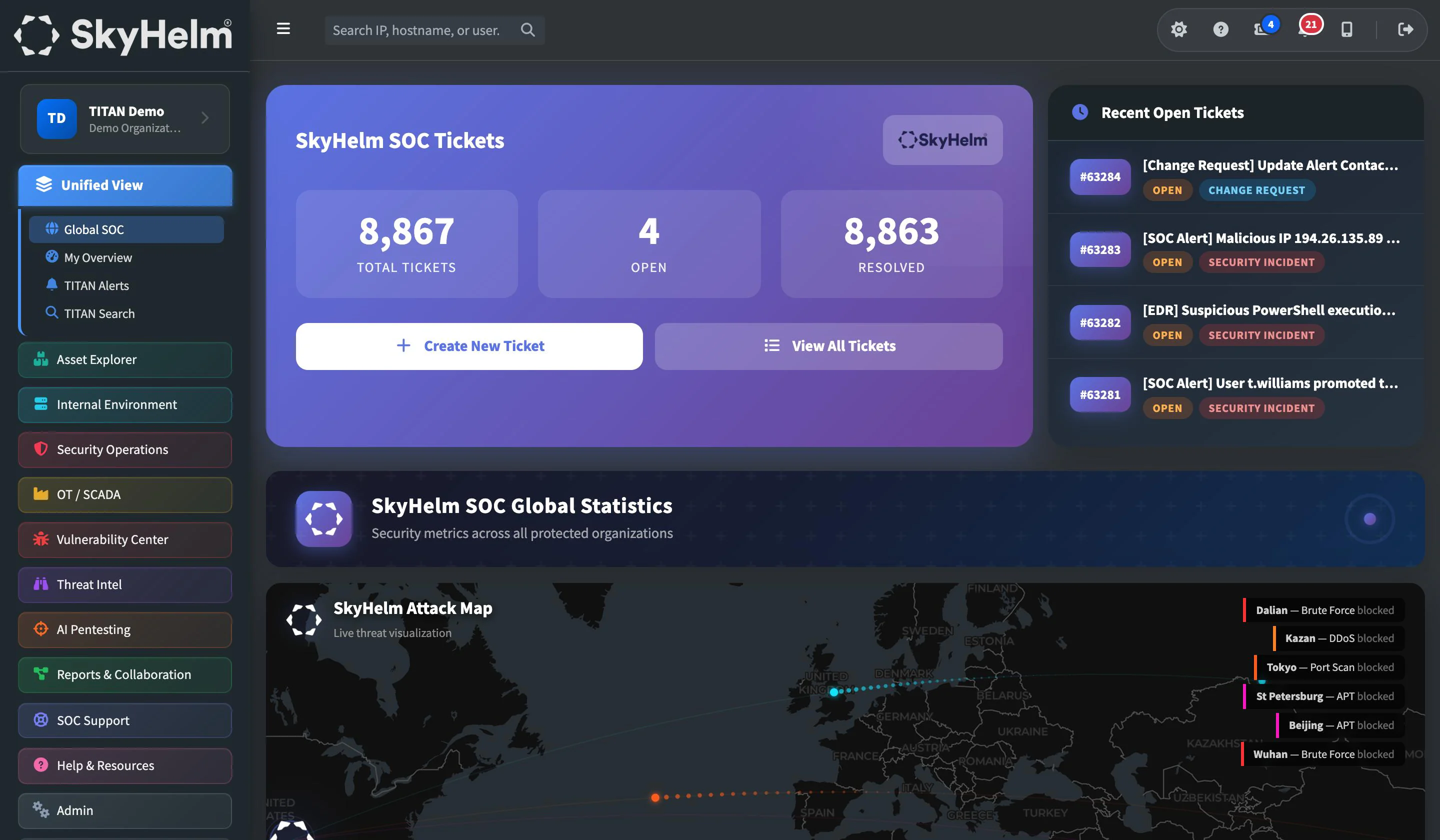
The single pane of glass that ties your entire security operation together. Every asset, every alert, every vulnerability, every OT anomaly, correlated, risk-ranked, and presented in one real-time view built for the way your IT team actually works.
Ticketing (PSA) · SIEM · EDR · RMM · Network monitoring · IT documentation · Vulnerability scanning · OT monitoring · Internet scan data · Dark web scanning · SkyHelm AI
Stop tab-switching. Start operating.
Your team doesn't need eight browser tabs and a spreadsheet to understand your security posture. They need one screen.
One Alert Inbox
TITAN Alerts pulls alerts from every connected tool into a single inbox with one severity scale. Acknowledge, dismiss or reopen any alert, and TITAN records who did it and when.
TITAN Search
One search box across every connected platform. Look up an IP, hostname, user, ticket, asset or domain and see everywhere it appears, without opening another console.
Click Anything to Investigate
Click any IP, hostname or domain on any page to pivot straight into seven investigation tools, with full context preserved. No re-searching. No lost context.
My Overview
Your organization on one page: the weekly recap, open alerts, support tickets and perimeter activity, so your team starts every day with the full picture.
Global SOC View
See what the SkyHelm SOC sees: a live attack map and SOC-wide monthly statistics across the organizations we protect.
Integration Health
SkyHelm checks every tool connection behind TITAN and is alerted when a nightly sync fails, so the data on your screen is data you can trust.
TITAN in Your Pocket
Native iPhone and Android apps push critical alerts the moment they land, and open the exact alert you were notified about.
Built Around How You Work
Navigation organized by purpose, one-click launch into each underlying tool's console, dark and light themes, and your own time zone.
Inside Unified View
The views your team will use every day.
The SkyHelm SOC landing page, with a live attack map and SOC-wide monthly statistics.
Every module feeds the unified view
Data from across your entire TITAN deployment flows into one correlated, risk-prioritized operational dashboard, automatically.
TITAN in your pocket.
Native apps for iPhone and Android put your organization's alerts in your hand. Notifications only reach signed-in, active users in the right organization whose role covers what the alert is about.
- Push notifications for new critical and high-severity alerts, with critical alerts delivered as time-sensitive
- Watchlist hits and SkyHelm announcements, pushed the moment they happen
- Tap a notification to open the exact alert or page it's about
- Face ID, Touch ID or fingerprint app lock, with a relock time you choose
- Sign in with your TITAN account and two-factor, or with Microsoft
- Sign a lost phone out remotely, and verify callers with a one-time code
Everything in Unified View
29 capabilities, every one included in TITAN.
Alerting & investigation
12- TITAN Alerts: one alert inbox across all of your tools with one severity scale
- Acknowledge, dismiss and reopen alerts, recording who did it and when
- New-alert counter in the top bar and a notification history
- TITAN Search: one search across every connected platform for IPs, hostnames, users, tickets, assets and domains
- Click any IP, hostname or domain on any page to pivot into seven investigation tools
- Drill-down detail views across every dashboard
- AI alert correlation: related events across SIEM, endpoints, network and OT grouped into one investigation
- Context-aware severity scoring by asset criticality, network topology, compliance boundaries and historical baselines
- Plain-language AI summary on every alert: the threat, its impact and the recommended action
- Automated runbook suggestions: recommended investigation and response steps for each alert
- Predictive threat scoring: systems and accounts at elevated risk flagged before an attack, with hardening recommendations
- Cross-customer pattern detection: a new technique seen at one organization becomes detection logic for all within hours
One platform
7- Single pane of glass across all categories
- Global SOC landing page with a live attack map and SOC-wide monthly statistics
- My Overview: your organization on one page, with the weekly recap, alerts, support tickets and perimeter activity
- Navigation organized by purpose, with tools your organization hasn't connected shown dimmed
- One-click launch into each underlying tool's own console
- Dark and light themes and a per-user time zone
- Integration health monitoring: SkyHelm checks every tool connection and is alerted when a nightly sync fails
TITAN mobile app
10- Native TITAN apps for iPhone and Android
- Push notifications for new critical and high-severity alerts, with critical alerts delivered as time-sensitive
- Push notifications for Threat Feed watchlist hits and SkyHelm announcements
- Tap a notification to open the exact alert or page it is about
- Face ID, Touch ID or fingerprint app lock with a relock time you choose
- Sign in with your TITAN account and two-factor, or with Microsoft
- Unread count on the app icon and an in-app notification history
- Notifications go only to signed-in, active users in the right organization whose role covers what the alert is about
- Remove a lost phone and sign it out remotely, or sign a person out everywhere
- Caller identity verification: SkyHelm can send a one-time code to a person's registered phone
Works hand in hand with
See the Unified View in action
Schedule a walkthrough and we'll show you how TITAN brings your entire security posture into one screen, correlated, prioritized, and actionable.