Asset Explorer. Every device. One truth.
One deduplicated inventory of every IT and OT device, with coverage gaps, locations and security posture.
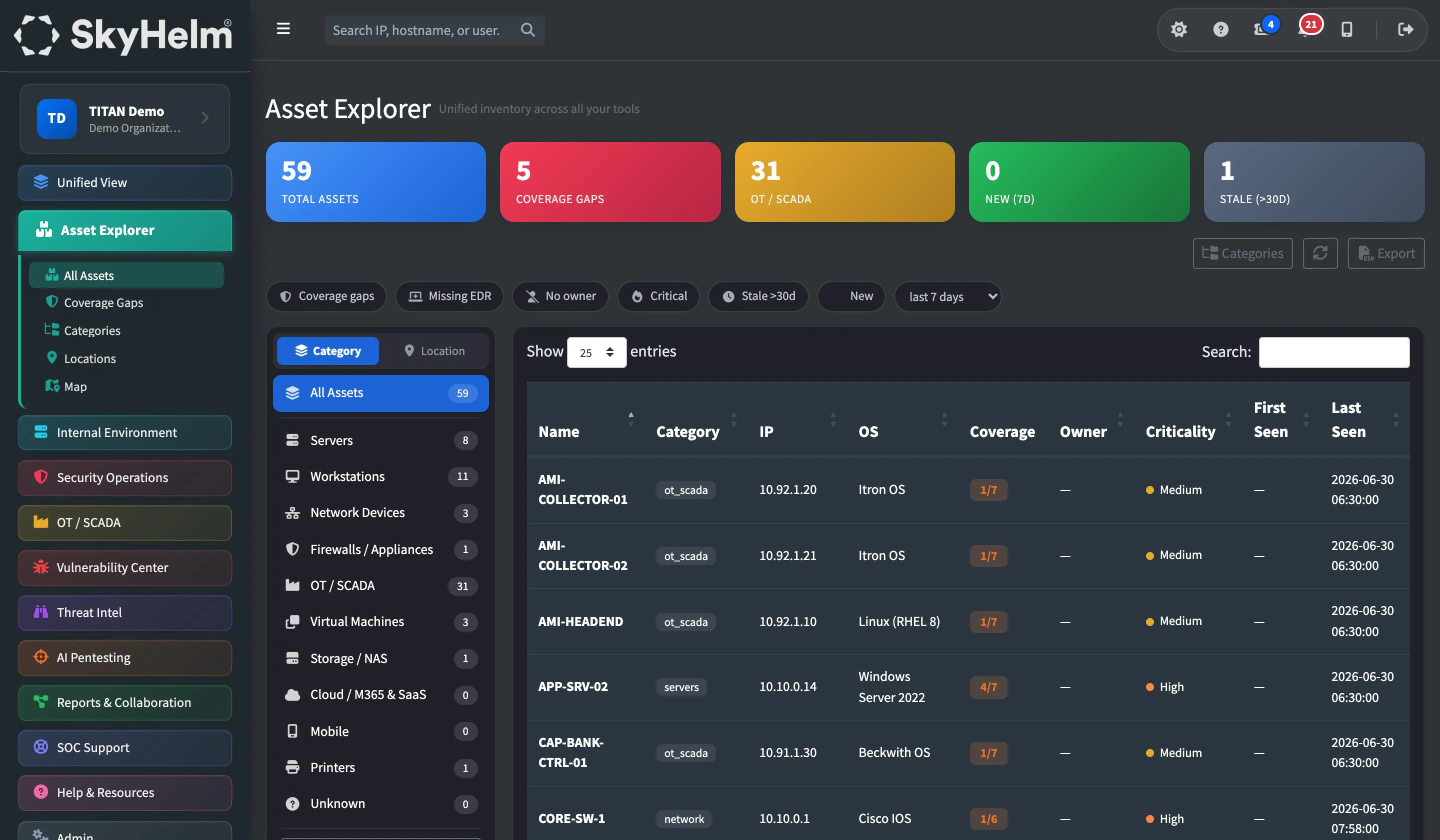
Your RMM, network monitor, EDR, vulnerability scanner and OT platform each keep their own device list, and none of them agree. TITAN merges them into one deduplicated inventory, shows which tools are missing which devices, and gives every asset a single page with everything known about it.
RMM · Network monitoring · EDR · Vulnerability scanning · OT monitoring · IT documentation · Internet scan data
Every device. Every tool. One inventory.
Stop reconciling device lists from six different consoles. TITAN builds the inventory for you and keeps it current.
Unified Asset Inventory
One deduplicated inventory built from every IT and OT tool you connect: RMM, network, EDR, vulnerability and OT platforms. One device, one record.
Coverage Gaps
See exactly which devices each security tool is missing: the server without EDR, the workstation the scanner never reached, the switch nobody is monitoring.
One Page per Asset
Every asset gets a page showing its software, patches, hardware, network, activity, vulnerabilities and security incidents, pulled together from every tool.
Owner, Criticality & Custom Fields
Record owner, criticality, status, tags, notes, site, room, rack and your own custom fields, and attach warranties, photos and documents to any asset.
Locations & Site Map
Managed locations and an interactive site map show where every asset lives, from headquarters to the substation rack.
Merge, Split & Bulk Edit
Merge duplicate assets, split them apart again, and bulk-edit many at once. Add devices no tool can see, or import them from spreadsheets and existing tools.
Internet Exposure Flags
Devices exposed to the internet are flagged from internet scan data, so the assets that matter most to an attacker stand out in your inventory.
Security Posture Score
A composite hardening score across Microsoft 365, workstations, servers and domains, with measured MFA, encryption, RDP and EDR coverage.
Living IT Documentation
A centralized documentation repository with warranty and lifecycle tracking, and relationship mapping from asset to application to user to site.
Inside Asset Explorer
The views your team will use every day.
One deduplicated inventory of every device across all of your IT and OT tools.
Find the devices your tools can't see.
Every security tool only protects the devices it knows about. TITAN compares each tool's device list against the unified inventory and shows exactly where the gaps are, so a server without EDR or a laptop the scanner never reached doesn't stay hidden.
Gaps and stale devices also appear in the Asset Inventory and Coverage Gaps report sections, so you can show your board the progress, not just the problem.
| Device | RMM | EDR | Vuln Scan | Network | OT |
|---|---|---|---|---|---|
| HQ-DC-02 | – | ||||
| FIN-WS-014 | – | ||||
| SUB7-HMI-01 | – | – | |||
| FIELD-LT-22 | – | ||||
| SCADA-HIST-01 |
Everything in Asset Explorer
21 capabilities, every one included in TITAN.
Unified asset inventory
14- One deduplicated inventory of every device across all of your IT and OT tools
- Coverage gaps: which devices each of your security tools is missing
- Category board with custom categories you define
- Managed locations and an interactive site map
- Asset pages showing that device's software, patches, hardware, network, activity, vulnerabilities and security incidents
- Owner, criticality, status, tags, notes, site, room, rack and custom fields on every asset
- File attachments on assets, such as warranties, photos and documents
- Merge duplicate assets, split them apart again, and bulk-edit many at once
- Add devices by hand that no tool can see, and import from existing tools or spreadsheets
- Internet-exposed devices flagged from internet scan data
- Each asset's open vulnerabilities shown on its page
- Assets found from TITAN Search by name, IP, MAC address, serial number, operating system, category or location
- CSV export that follows your filters
- Asset Inventory and Coverage Gaps report sections, including stale devices
IT documentation & posture
7- Centralized IT documentation repository
- Automated asset discovery and enrichment
- Warranty and lifecycle tracking
- Relationship mapping (asset to app to user to site)
- Credential / secret management integration
- Security Posture dashboard: a composite hardening score across Microsoft 365, workstations, servers and domains, with drill-downs
- Security Hardening reporting: measured MFA, encryption, RDP and EDR coverage
Works hand in hand with
Know every asset you own
Schedule a walkthrough and we'll show you how TITAN turns every tool's device list into one inventory, and shows you the gaps between them.