Remote Monitoring and Management. Every endpoint, handled.
Monitor, patch, script and remotely support every workstation, server and mobile device.
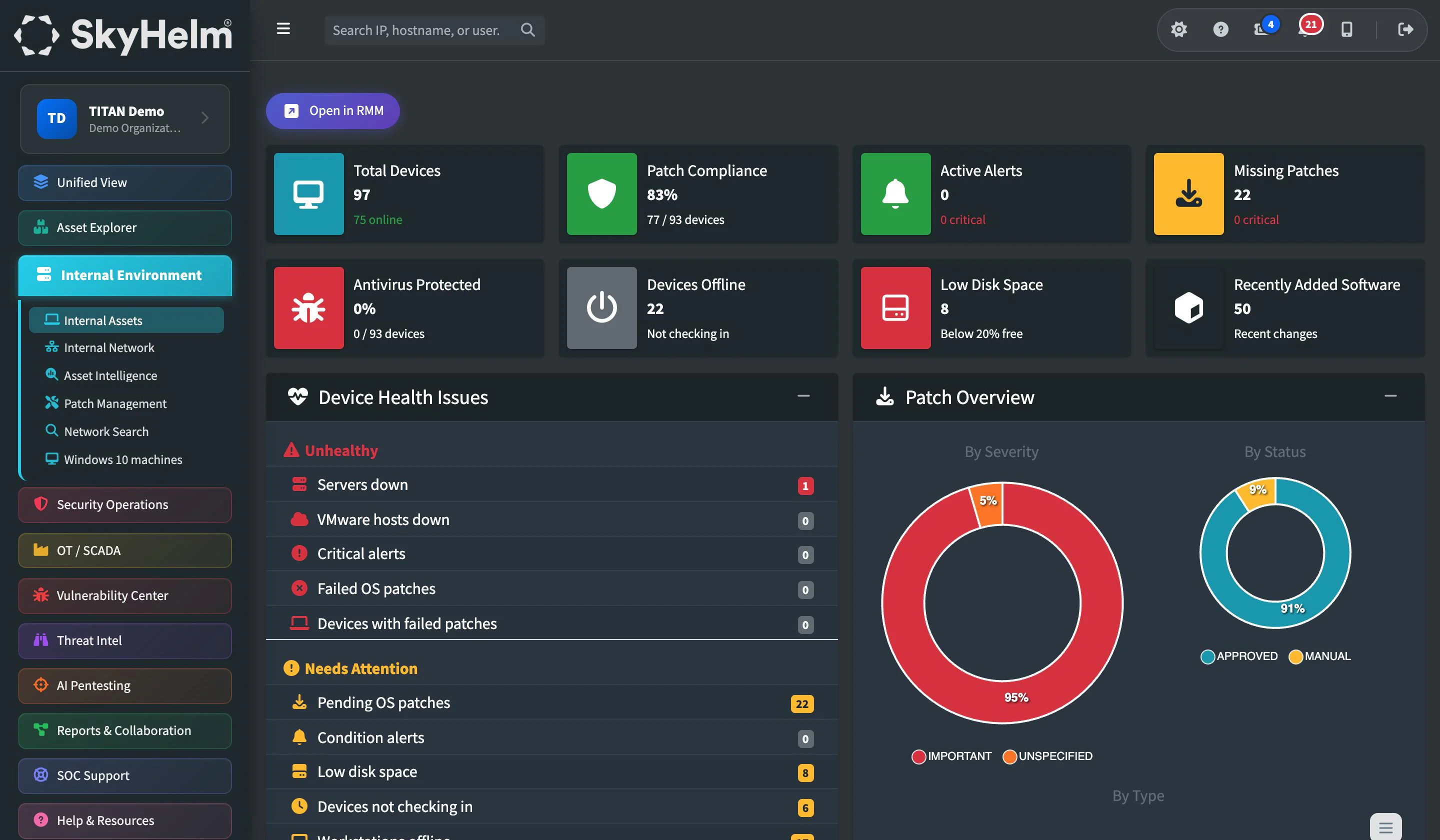
Every server, workstation, laptop and mobile device across your organization, discovered, monitored, patched, and supported from a single pane of glass. Your IT team stops guessing what's on the network and starts controlling it.
RMM agents · Patch management · Mobile device management
Everything you need to run every endpoint
Stop maintaining asset spreadsheets. Stop wondering what's patched. TITAN replaces guesswork with ground truth.
Automated Device Discovery
Every server, workstation, laptop, and managed device across your organization is auto-discovered and inventoried. No manual spreadsheets. No stale asset lists. If it's on your network, TITAN knows about it.
Live & Historical Health
CPU, memory, disk, uptime, and service status across every endpoint, live and over time. Know which substation server is running hot before it goes down on a Friday night.
AI-Assisted Patch Management
OS and third-party patching with automated AI patch analysis. A dedicated dashboard shows your compliance gauge, a risk-weighted device leaderboard and the fleet impact of every KB.
9,000+ Third-Party Apps
Robust third-party patching across more than 9,000 approved applications, so the browsers, readers and utilities attackers target most stay current.
Secure Remote Access
Remote desktop and shell access from anywhere, without driving 45 minutes to a substation. Background mode lets a technician work on a machine without taking over the user's screen.
400+ Built-In Scripts
Automated software deployment and scripting with more than 400 built-in scripts. Run them across device groups and your two-person team operates like a twenty-person department.
Inventory Reporting
Enterprise hardware and software inventory reports, generated automatically for board presentations, license reviews and NERC CIP evidence.
Mobile Device Management
Android and Apple devices managed right alongside your traditional ones: locate, lock and wipe, push apps and policies, filter DNS, and keep BYOD work apps apart from personal data.
Inside Remote Monitoring and Management
The views your team will use every day.
Every managed endpoint with live health, hardware and software inventory.
Support any device, from anywhere.
Your technician shouldn't have to drive 45 minutes to a substation to reboot a service or check a log file. TITAN's built-in remote support tools let your team connect to any managed device instantly, whether it's a workstation at headquarters or an engineering laptop at a field office.
Launch a full remote screen share session to walk a user through an issue, troubleshoot visually, or take direct control when needed. For deeper work, drop into a remote PowerShell, Command Prompt or terminal session directly from the TITAN console, run scripts, check services, pull logs, and resolve problems without ever leaving your desk.
Discover. Monitor. Maintain. Report.
A continuous lifecycle that keeps your asset inventory accurate, your devices healthy, and your compliance evidence ready, without manual effort.
Discover
Agents auto-enroll devices as they join your network. New workstation at a substation? It appears in your inventory within minutes, classified, tagged, and policy-compliant.
Monitor
Continuous telemetry streams health data to TITAN. CPU trending high on a SCADA historian? You'll know about it before operators notice the slowdown.
Maintain
Patches deploy on schedule. Scripts run across device groups. Remote sessions resolve issues in minutes, not hours. Proactive maintenance replaces reactive firefighting.
Report
Asset counts, patch compliance percentages, software inventory, and uptime, generated automatically for board presentations and NERC CIP evidence packages.
Everything in Remote Monitoring and Management
20 capabilities, every one included in TITAN.
Endpoint management
11- Automated Endpoint Discovery and Auto-Importation of Inventory
- Remote monitoring of Workstations, Servers, Network Devices, Virtual Infrastructure, and Mobile Devices
- Patch Management with Automated AI Patch Analysis
- Secure Remote Access from anywhere w/ background mode
- Remote cmd, Remote Powershell, Remote Terminal
- Automated software deployment and scripting (400+ built in scripts)
- Enterprise Hardware and Software Inventory Reporting
- Robust 3rd party software patching (9,000+ approved software/programs/applications)
- Historical & Live Endpoint health and performance monitoring
- Dedicated Patch Management dashboard: compliance gauge, risk-weighted device leaderboard and KB-level fleet impact
- Clickable drill-downs for patch compliance, missing patches and low-disk devices, down to each device
Mobile device management
9- Remote device locate, lock, and wipe
- Remote support and screen share for mobile devices
- Configuration profiles and policy enforcement
- Private app catalog / local app store
- Secure DNS filtering for mobile devices
- Automated device enrollment and provisioning
- App management and restriction policies
- Work with Android, Apple, right alongside your traditional devices
- BYOD Options, manage your business applications without interfering with personal data
Works hand in hand with
See every endpoint, in one view
Schedule a walkthrough and we'll show you how TITAN discovers, monitors, and manages every device across your organization. No more spreadsheets. No more blind spots.